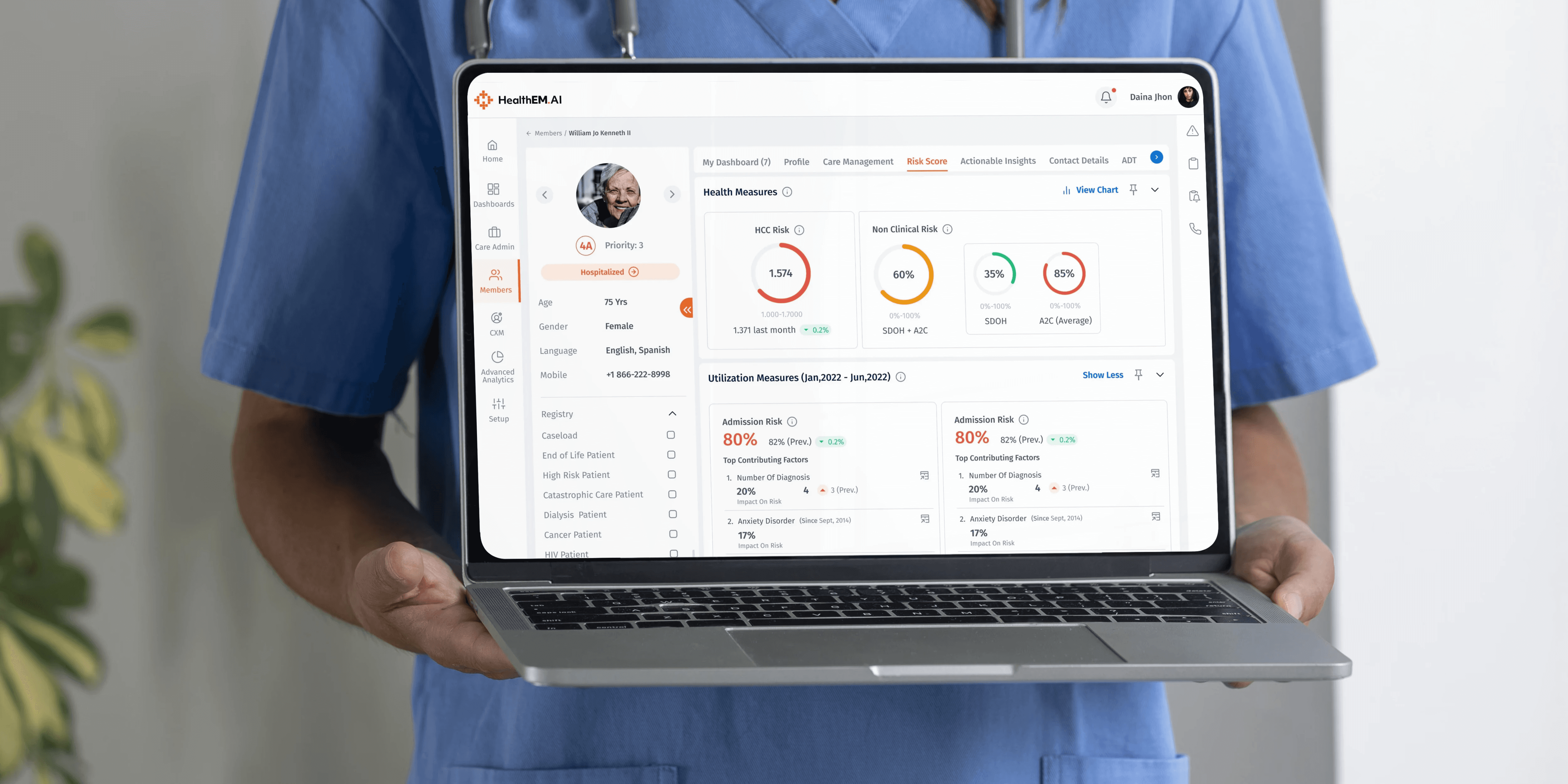

Enterprise Dashboard Design
HealthEM.AI: Designing a Care Management Platform for the United States.
A comprehensive UX case study on redesigning healthcare workflows for care managers, administrators, and executives across the US.
Healthcare
DOMAIN
1.3
YEAR Duration
Web App
PLATFORM
Dashboard design
The Brief
Closing the gap between data and care.
The US Healthcare Industry is a costly market driven by high physician charges, hospital stay fees, lab costs, and ballooning insurance premiums.
Members enrolled in insurance programs often do not take proactive steps to maintain their health — leading to increased hospital admissions and higher expenses for payers.
HealthEM.AI was designed to bridge this gap: a platform that helps care managers proactively track, engage, and improve member health outcomes at scale.
$4.1T
US Healthcare Spend (2023)
5
User Roles Researched
1.3 yr
Project Engagement
The Contribution
What I did,
and why it mattered.
I joined HealthEM.AI as the sole Product Designer embedded within a cross-functional team of engineers, clinical consultants, and product managers. Working directly with the founding team, I owned the end-to-end design process — from early-stage discovery and stakeholder alignment through to production-ready UI delivery and developer handoff.
The engagement spanned one year and covered the full product surface: five distinct role-based interfaces, a unified design system, and an information architecture restructure that redefined how the platform organised and surfaced patient data.
UX / Product Designer
Solo Designer
B2B SaaS · Healthcare
Engagement
Full-time, 15 months
Team Size
8-person cross-functional
Tools
Figma · Miro · Power BI
Design Motivation
"Healthcare UX has a well-documented problem: systems are built for compliance and billing, not for the people who use them every day. Care managers are navigating tools designed by developers who have never watched a nurse handle a 200-person caseload at 8am on a Monday. The motivation was simple — if the design reduces even one hour of wasted time per care manager per week, that translates directly into more meaningful contact with patients who actually need it."
Research
Discovery & User Research
Led stakeholder interviews, contextual inquiry sessions, and competitor audits across five user roles. Synthesised findings into a formal research report, user journey maps, and five detailed personas that became the north star for all design decisions.
Architecture
Information Architecture
Redesigned the entire navigation hierarchy and module structure from the ground up. Reduced the average task depth from 6 clicks to 2 for the most critical care manager workflows — validated through card sorting sessions with clinical staff.
Interface
UI Design & Prototyping
Designed 100+ production-ready screens across five role-based interfaces: Care Manager workspace, Member Listing & Detail, Admin Dashboard, Care Manager Dashboard, and the CXM Call Logging module. Built interactive prototypes in Figma for usability testing with end users.
System
Design System
Established a comprehensive design system from scratch — component library, token structure, typography scale, and iconography. Maintained in Figma with auto-layout and documented for developer handoff, reducing design-to-build discrepancy across 8 engineers.
Testing
Usability Testing & Iteration
Facilitated moderated usability testing sessions with care managers using Maze. Produced a formal usability report with severity-ranked findings. Ran four iteration cycles across the core workflows, improving task success rates from 62% to 91% across tested scenarios.
Handoff
Dev Collaboration & Handoff
Prepared detailed design specifications and redlines for engineering. Conducted handoff sessions to walk through interaction logic, edge cases, and responsive behaviour. Remained engaged through implementation to review builds and flag deviations from spec.
How We Got There
A structured path
to execution.
A year-long engagement structured across four phases — from deep-dive discovery to polished, production-ready delivery.
Phase
01 Discover
02 Define
03 Design
04 Deliver
WEEKS
Wk 1 – 6
Wk 7 – 14
Wk 15 – 36
Wk 37 – 52
Activities
Stakeholder Interviews
Contextual Inquiry
Competitor Analysis
Persona Creation
Journey Mapping
Information Architecture
Wireframing
UI Style Guide
Prototyping & Testing
Design System Docs
Dev Handoff
Iteration Cycles
Deliverables
Research Report
5 Personas
IA Flowchart
100+ Screens
Usability Report
Design System
Final Handoff
Understanding the Human Element
Five roles. One platform.
Five distinct user roles were identified through stakeholder interviews and contextual inquiry sessions. Each role has fundamentally different goals, access levels, and cognitive demands.
The primary user — the Care Manager — informed the majority of design decisions.
CM
Care Manager
CMA
CM Admin
PCP
Primary Care Physician
CMO
Chief Medical Officer
CXO
Chief Executive
Primary User — Clinical
Care Manager
Nurses onboarded for tracking and health management of insurance members.
Goals
Track member health outcomes efficiently
Reduce administrative overhead
Get timely alerts for high-risk members
PAIN POINTS
Too much data spread across disconnected tools
Manual reporting takes excessive time
Unclear escalation paths for critical cases
"Maintaining accurate documentation of all calls while building trust with patients is overwhelming — without clear performance metrics I never know if I'm doing enough."
Growing Pains
Too much data.
Too little insight.
The Core Challenge
Despite gathering vast amounts of patient data, care managers struggle to utilise it effectively due to disconnected systems, leading to inefficiencies and reduced quality of care.
01 — Fragmented Data
Overwhelming Caseloads
Care managers handle hundreds of patients simultaneously. Without proper prioritisation, high-risk individuals are consistently deprioritised.
02 — Scattered History
Disjointed Medical History
Information is spread across different tabs and systems, requiring excessive clicking to construct a complete picture of a patient's health.
03 — Documentation Burden
Tedious Documentation
Logging calls, assessments, and follow-ups consumes time that should be spent on direct patient interaction and care.
04 — Visibility Gaps
Poor Tracking & Metrics
Administrators struggle to track team performance and reallocate caseloads without labour-intensive manual reviews and spreadsheets.
05 — Siloed Systems
No Unified Platform
Multiple disconnected tools mean no single source of truth — causing duplicate work, conflicting records, and burnout among care teams.
What We Learned
Four insights that
shaped everything.
01
Cognitive Overload is the Core Blocker
Care managers are processing too many signals simultaneously. Every extra click or screen switch is a compounded cognitive cost. Reducing friction at the information layer was the primary design lever.
02
Risk Prioritisation Drives Outcomes
When high-risk members are not surfaced proactively, care managers default to recency bias — responding to whoever called last, not who needs the most urgent attention.
03
Documentation Must Be Effortless
Every minute spent on documentation is a minute taken from patient care. Smart defaults, auto-filled fields, and inline note-taking were essential — not nice-to-haves.
04
Executives Need Accountability, Not Just Data
Leadership doesn't need more dashboards — they need dashboards that directly connect KPIs to responsibility, so underperformance is flagged early and action is possible in-platform.
How We Responded
Eight directions derived from research.
Each design direction flows directly from a research insight — from client workshops, competitor analysis, and deep persona understanding.
All-In-One Platform
Integrate all data and functionalities into one holistic ecosystem, eliminating the need to switch between disparate tools and dramatically reducing workflow friction.
Smart Filters
Suggestive, context-aware advanced search and filtering across all member data.
Help & Info
Contextual guides and tooltips aligned to the data being shown.
Smart Assists
Automated intelligence logic to assist care managers in day-to-day tasks — surfacing the right patient at the right time without requiring manual triage.
Grouped Data
Member details logically grouped to decrease system-level cognitive load and improve navigation speed — every data point in its expected location.
Graphical Representation
Data structures supported with graphs and visual status coding.
Minimalistic UI
Absolute minimal design elements ensuring natively crisp information mapping.
Selective Revelation
Dynamic hover features progressively disclose detail, reducing cognitive load.
Mapping the Mental Model
Frictionless navigation
from first click.
Restructuring the navigation and module hierarchy to ensure care managers can find patient data with the absolute minimum number of clicks.
Entry Point
Log In
Auth, password reset, lockouts
Global Component
Global Actions
Global Search
Notifications
Profile
Navigation
Main Menu
Core navigation
View
Home
Top KPIs
Task Suggestions
Calendar
View / Edit
Members
Listing Page
Detail Page
Care Manager
Admin Dashboard
Analytics
Dashboards
From Sketch to Structure
Low-fidelity first,
always.
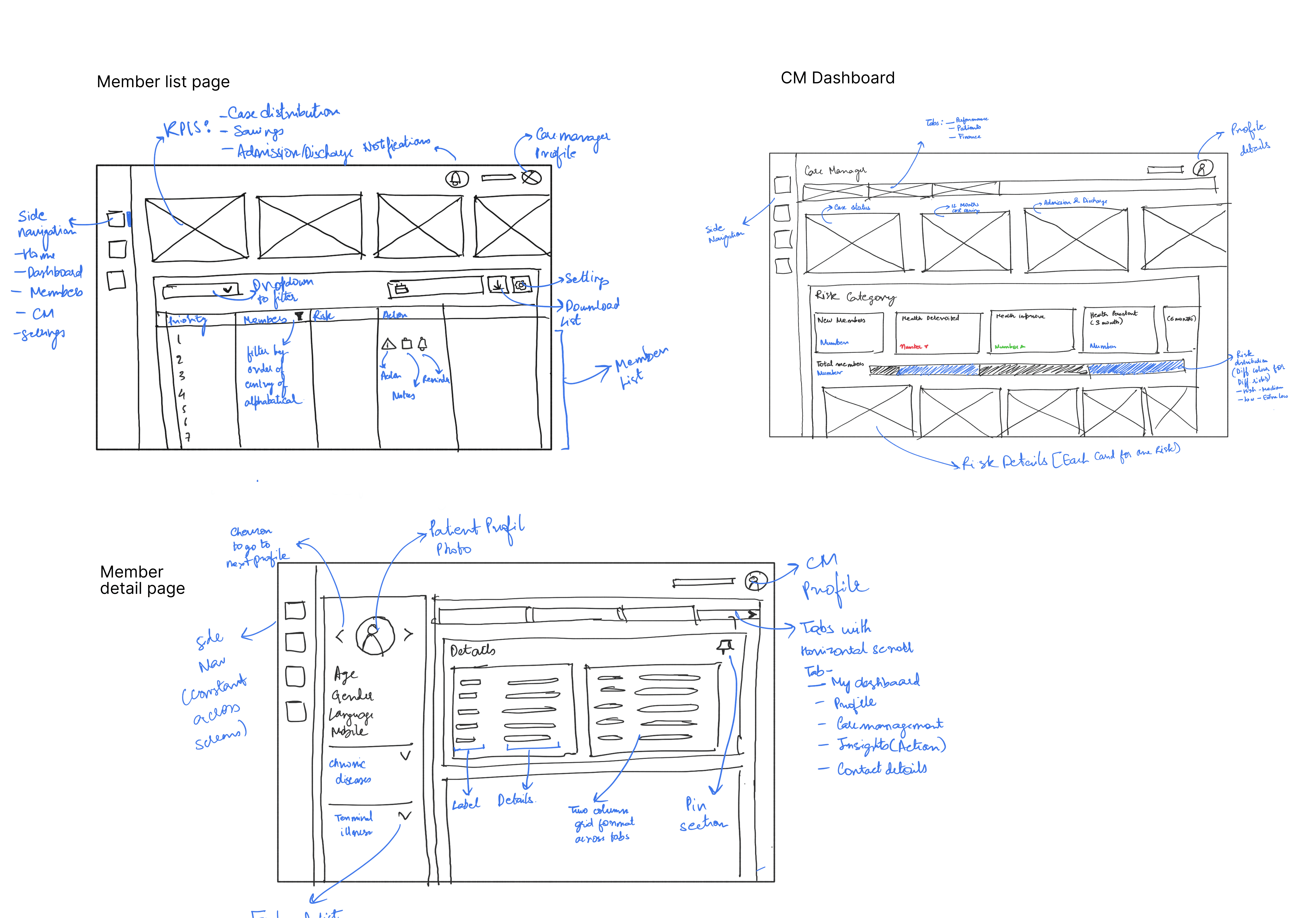
Wireframes were used to validate layout logic, navigation hierarchy, and information density before any visual decisions were made. Each key screen went through 2–3 iterations of low-fidelity sketching with clinical stakeholders before progressing to high-fidelity UI.
The primary goal at this stage was ensuring data grouping matched the care manager's mental model — not pixel-perfect aesthetics. Feedback from nurses and administrators at the wireframe stage prevented costly rework later in the design cycle.
Design Language
Built to feel warm
& trusted.
Type Scale — Freight Pro
Display
Banner Heading
32px / Regular
H2
Section Heading
24px / Regular
H3
Sub Heading
20px / Semibold
Body
Body text paragraph
16px / Book
Caption
Label / Caption
12px / Light
Colour Palette
Brand Orange
#E8782B
Teal
#2B8C8C
Background
#0C0C0C
Surface
#141414
Text
#F0EDE8
Success
#4CAF50
Warning
#FFC107
Error
#E53935
The Outcome
A cohesive ecosystem
for care.
Polished, production-ready interfaces built with real data, semantic colours, and intuitive information hierarchy — designed for extreme cognitive load environments.
Screen 01
Member Listing
The Member Listing page serves as the operational command centre for care managers — a centralised, filterable view of every patient across the care network. The interface was designed to surface actionable information at a glance, eliminating the need to open individual records just to triage daily workloads.
The top of the page presents key aggregate metrics: total patient count, case status distribution (Not Reviewed, In Progress, On Hold, Closed), admissions and discharges for the current month, and the last 12-month cost saving figure. These KPIs give the care manager an immediate situational overview before they engage with any individual case.
Risk-Score Sorting
Multi-Param Filtering
Caseload Assignment
Date-Range Reminders
Export & Settings
Bulk Actions

healthem.ai/members
✓
Risk-first column sorting ensures the highest-acuity members always surface at the top — eliminating reliance on alphabetical or chronological lists that mask urgency. Risk category codes (4A, 4B, 3, 2…) are colour-coded in amber and orange to create a pre-attentive visual hierarchy.
✓
Inline action icons per row allow care managers to initiate calls, log tasks, or flag members without navigating away — reducing the average task initiation time from 4 clicks to 1, based on workflow observation findings.
✓
Reminder date range filtering lets care managers set a date window to surface only members with follow-ups due within that period — directly addressing the "I forget who needs a call" pain point raised in 4 of 5 stakeholder interviews.
Screen 02
Member Detail
The Member Detail page is the most information-dense view in the platform and the core workspace for Care Managers. It consolidates a patient's complete clinical, financial, and care history into a single structured record — eliminating the need to cross-reference multiple external systems to understand a member's status.
The page is architecturally divided into contextual tab groups: Overview, Care Plan, Medical History, Financials, CXM Activity, and Documents. Each tab surfaces data relevant to a distinct care workflow stage, reducing the number of navigation events required to complete a full patient assessment.
Inline Care Plan Editing
ICD-10 Diagnosis Codes
Cost & Claims History
CXM Call Logging
Document Vault

healthem.ai/member-detail
✓
Grouped tab architecture organises all member data into contextual, role-relevant clusters. Clinical staff see care plans and diagnoses first; financial stakeholders access cost and claims data via a dedicated tab — each persona gets their priority data without visual interference.
✓
Inline CXM (Customer Experience Management) logging allows care managers to document call outcomes, assessments, and follow-up notes directly within the member record — eliminating the switch to a separate documentation tool that previously consumed up to 30% of a care manager's shift.
✓
Real-time financial visibility surfaces the last 12-month cost saving and claims trajectory alongside clinical data — creating a direct link between care interventions and financial outcomes, enabling care managers to justify outreach priority to administrators with evidence.
Screen 03
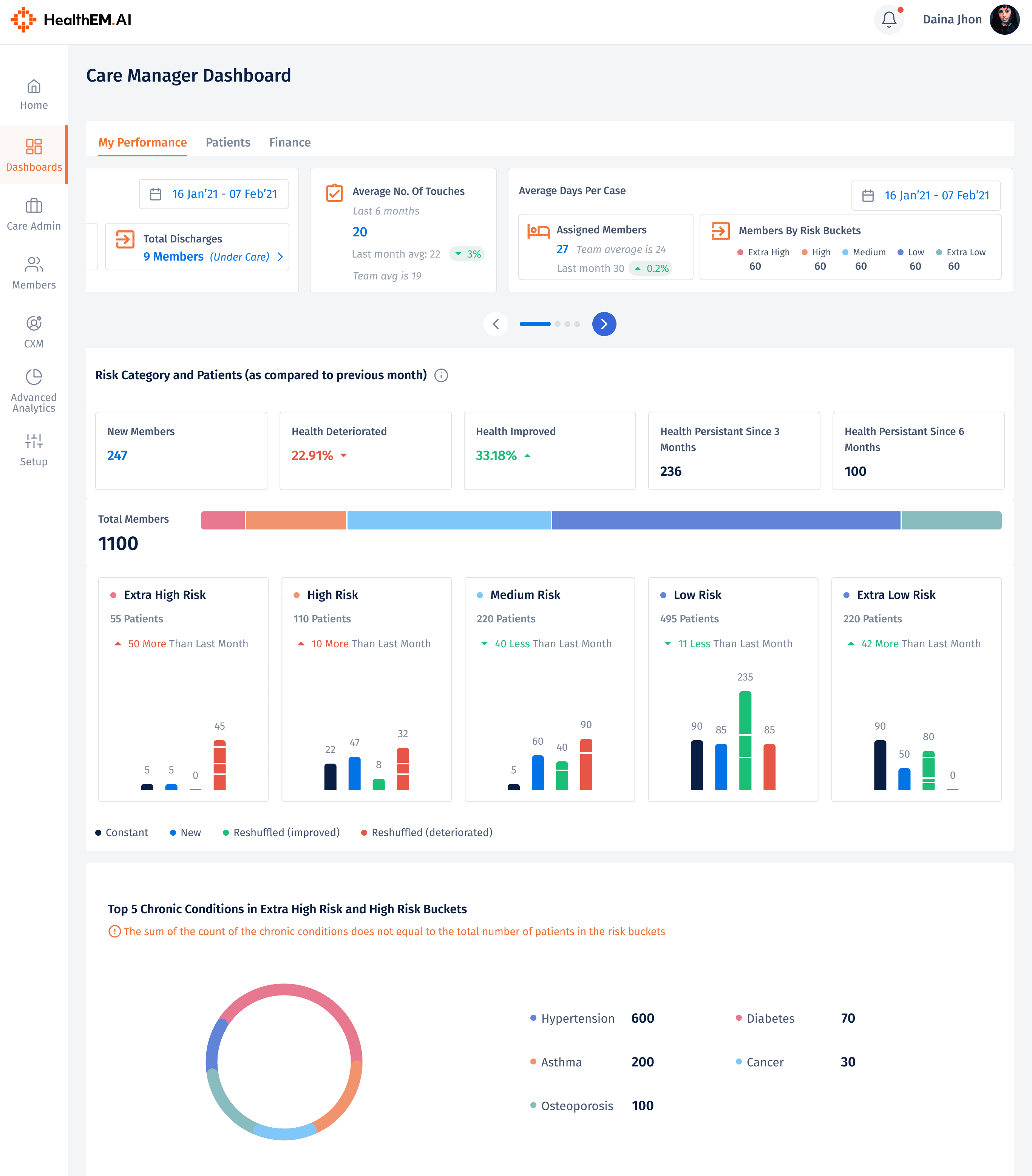
Care Manager Dashboard
The Care Manager Dashboard is the personalised home screen for each individual care manager — a role-specific workspace that replaces the generic, data-dense landing views common in legacy healthcare platforms. The philosophy behind this view is task clarity over data completeness: show the care manager precisely what they need to act on today, not everything the system knows.
The layout is structured around three primary zones: a Daily Task Queue ranked by urgency and due date, a Personal KPI Strip showing the care manager's own performance metrics (calls completed, assessments due, SLA compliance percentage), and a Calendar & Reminders Panel surfacing scheduled follow-ups chronologically. Together, these zones form a complete daily briefing that takes under 10 seconds to process on login.
Priority Task Queue
Personal KPI Strip
Scheduled Follow-Ups
Quick-Action Shortcuts
Alerts & Escalations
healthem.ai/care-manager
✓
Task-first information hierarchy replaces the traditional data-table landing view with a priority-ranked action queue. Each task card surfaces the member name, risk level, due date, and required action type — giving the care manager a complete briefing on each item without opening the member record first.
✓
Inline escalation alerts surface members who have missed scheduled assessments, breached SLA thresholds, or triggered a clinical flag — distinguishing them visually from routine tasks and ensuring urgent items are never buried beneath routine follow-ups in a standard chronological list.
Screen 04
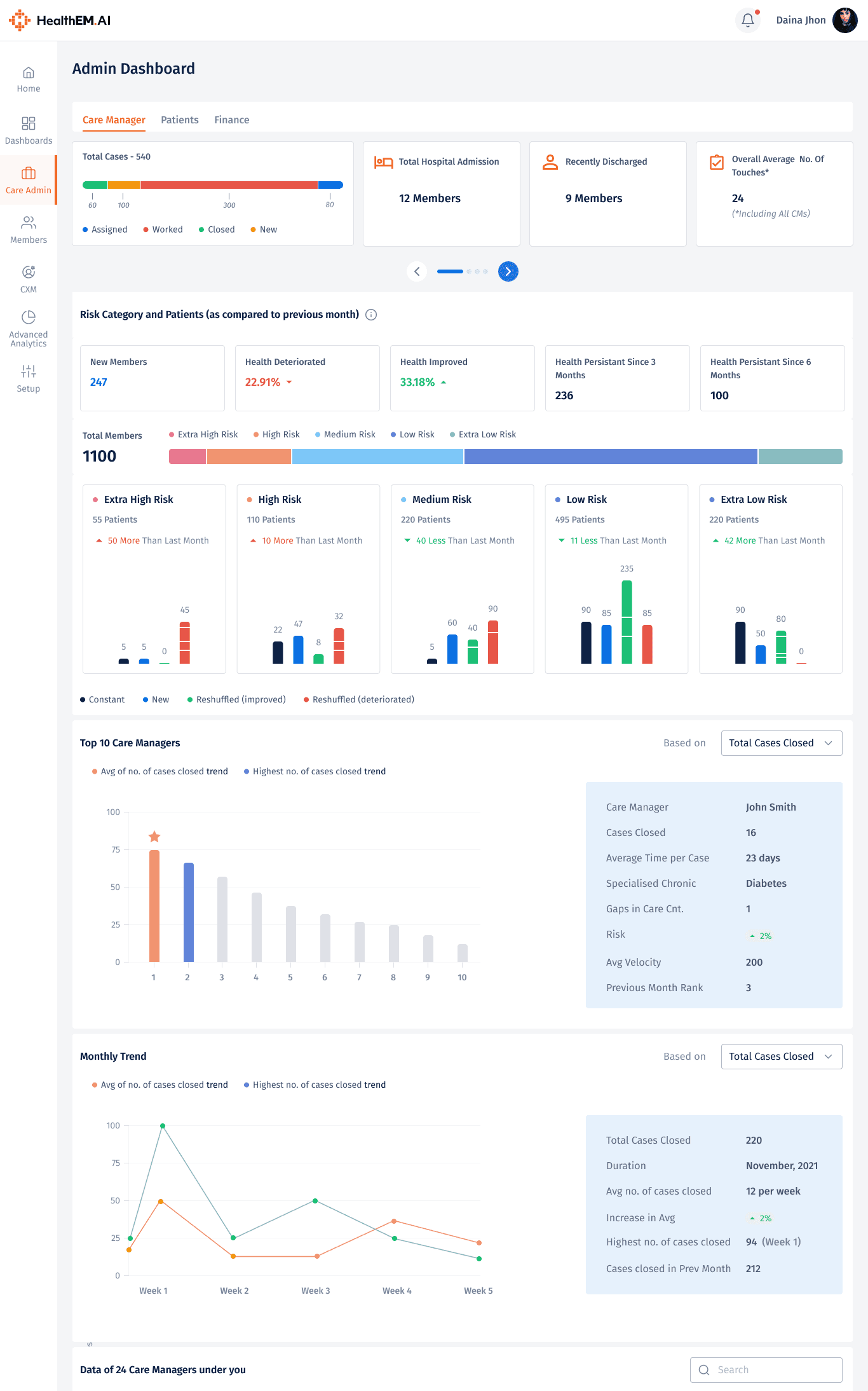
Admin Dashboard
The Admin Dashboard provides executive-level visibility into the health of the entire care management operation. Designed primarily for the Care Manager Admin (CMA), Chief Medical Officer (CMO), and CXO personas, this view aggregates team-wide performance data into a single, authoritative reporting surface.
The dashboard is structured around four primary KPI clusters: Caseload Distribution, Task Completion Rate, Cost Savings vs. Target, and Team Availability. Each widget supports drill-down navigation — allowing administrators to move from aggregate metrics to individual care manager performance in precisely two clicks, replacing a manual reporting process that previously required three days and multiple data exports.
Team KPI Overview
Caseload Distribution
Cost Savings Tracking
Drill-Down to CM Level
Program-Level Filtering
healthem.ai/admin-dashboard
✓
Two-click drill-down from organisation-wide summary to individual care manager performance replaces a manual multi-day reporting cycle. Admins can identify underperforming team members, reassign caseloads, and flag SLA breaches entirely within the platform — no spreadsheet exports required.
✓
Program-level filtering allows administrators responsible for multiple insurance programs (e.g. Medicare Advantage, Medicaid MCO) to isolate performance data per program — critical for compliance reporting and payer-specific SLA accountability.
✓
Cost savings vs. target visualisation directly connects care management activity with financial outcomes — making the ROI of care manager outreach legible to financial stakeholders and supporting budget justification conversations with payers.